

CAD Symbol Library for Electrical and Fluid Power (AutoCAD, BricsCAD, ZWCAD)
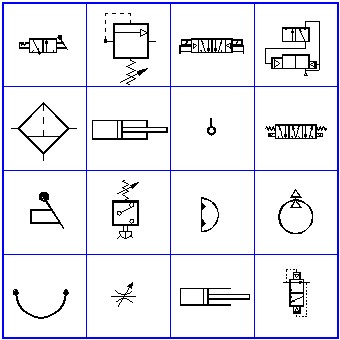
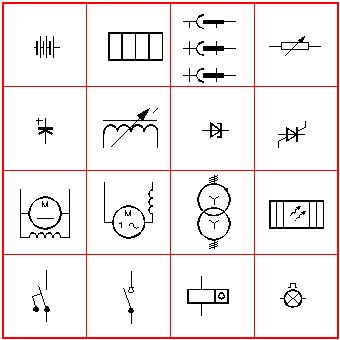
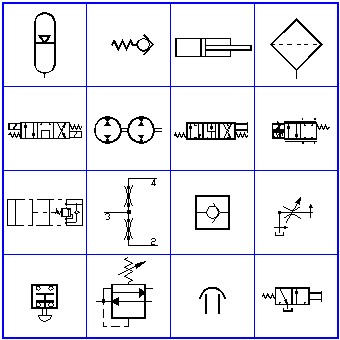
This page has recently been updated with expanded symbol categories, improved compatibility details, and support for additional CAD platforms, including BricsCAD and ZWCAD.
Fast Access To Electrical & Fluid Power Symbols
This CAD symbol library gives you fast access to electrical, hydraulic, and pneumatic symbols directly inside your drawing. Instead of searching through folders or managing thousands of blocks, everything is organized into clear categories and inserted through a simple menu.
Originally built for AutoCAD users, this library is now also being used in BricsCAD, ZWCAD, and other CAD platforms that support AutoLISP.
What Makes This Library Different
- Symbols are organized into logical categories for fast selection
- Menu-driven system makes insertion quick and consistent
- No need to search for or manage individual block files
- All symbols are drawn to recognized industry standards
- Symbols insert on Layer 0 and inherit your current layer automatically
- Works directly inside your CAD environment using AutoLISP
What’s Included in the Library
Electrical Symbols
• Conductors and connection devices
• Resistors, capacitors, and inductors
• Semiconductors
• Switchgear and control devices
• Protective devices
• Measuring instruments
• Lamps and signaling devices
Fluid Power Symbols
• Hydraulic valves and valve outlines
• Cylinders and actuators
• Pumps and motors
• Flow control and pressure control devices
• Filters and heat exchangers
• Check valves and motion control
• Pneumatic components
Standards Used
All symbols in the library are based on recognized industry standards to ensure consistency and compatibility across drawings.
Electrical symbols
• Based on IEC 60617 standard symbols
• Commonly used for schematic diagrams and control systems
• Designed to align with international electrical drawing practices
Fluid power symbols
• Based on ISO 1219 standard symbols
• Covers hydraulic and pneumatic system representation
• Widely used in mechanical and industrial applications
General notes
• Symbols are drawn cleanly for clarity at multiple scales
• Designed for use in professional engineering drawings
• Compatible with typical office drafting standards
Using standardized symbols helps maintain consistency across projects and makes drawings easier to read, share, and review.
Works with Multiple CAD Platforms
This library runs inside CAD programs that support AutoLISP.
Tested and Supported
• AutoCAD
• AutoCAD LT (2024 and newer)
• BricsCAD
• ZWCAD
Also Works With
• GstarCAD
• IntelliCAD-based CAD applications
• Other LISP-compatible CAD platforms
If you are using a different CAD program and are unsure, feel free to reach out and we can confirm compatibility.
How the CAD Library Works
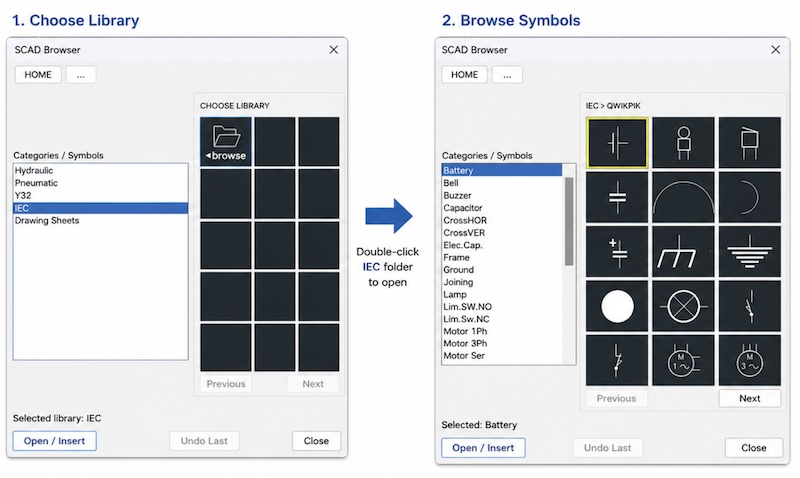
The library is fully menu-driven. You select a category, choose a symbol, and insert it directly into your drawing.
Because the symbols are organized by category, you spend less time searching and more time drafting.
All symbols are inserted on Layer 0, so they automatically take on the properties of the current layer. This keeps your drawings clean and consistent without extra setup.
Best Fit for This Library
• Electrical and control schematic drafting
• Hydraulic system diagrams
• Pneumatic system layouts
• Fast access to standardized symbols
• Menu-driven workflow instead of block searching
• Consistent layer control using Layer 0 inserts
• Teams standardizing symbols across drawings
• Users moving from AutoCAD to BricsCAD or ZWCAD
Example Category Structure
The library is organized into clear, nested categories so you can quickly drill down and find the symbol you need.
Hydraulic Example
• HYD > Hydraulic Valves > Relief Valves > P-T
• HYD > Hydraulic Valves > Flow Control > Meter-In / Meter-Out
• HYD > Hydraulic Valves > Check Valves > A Side / B Side
• HYD > Cylinders > Double Acting / Single Acting
• HYD > Pumps and Motors > Fixed / Variable
• HYD > Sandwich Valves > Subplates and Stack Valves
Electrical Example
• ELEC > Switchgear and Control > Circuit Breakers
• ELEC > Switchgear and Control > Contactors and Starters
• ELEC > Conductors and Connections > Terminals and Wiring
• ELEC > Passive Components > Resistors / Capacitors / Inductors
• ELEC > Measurement Devices > Meters and Indicators
• ELEC > Signaling Devices > Lamps and Alarms
Pneumatic Example
• PNEU > Valves > Directional Control Valves
• PNEU > Actuators > Cylinders
• PNEU > Air Preparation > Filters / Regulators / Lubricators
• PNEU > Flow Control > Restrictors and Regulators
• PNEU > Check Valves and Pressure Devices
This structure allows you to navigate the library logically rather than searching for individual block names. The result is faster symbol selection and a more consistent workflow.
CAD Compatibility Notes
This library is not locked to AutoCAD. It is designed to work across multiple CAD platforms that support AutoLISP, giving you flexibility if you decide to switch CAD systems.
Frequently Asked Questions
Does this work in AutoCAD LT?
Yes. Newer versions of AutoCAD LT support AutoLISP, so the library runs directly inside LT.
Can I use this with BricsCAD or ZWCAD?
Yes. The library works in both and is now being offered for those platforms.
Are the symbols metric or imperial
The electrical symbols follow IEC standards (metric), and the fluid power symbols follow ISO standards. Imperial versions are also being added.
Do I need to install thousands of blocks?
No. The system uses a menu interface, so you do not need to manage block files manually.
Immediate download after purchase with free support when you need it. License is 100% yours.
Installation and Support
The library is designed to be simple to install and easy to manage.
Installation typically takes about 10 minutes and includes step-by-step instructions. Most users are up and running quickly without needing additional help.
If needed, remote installation assistance is available for setup or troubleshooting.
• Simple installation with clear instructions
• Typical setup time is about 10 minutes
• Remote install assistance available if needed
• Unlimited support available after purchase
Value and Pricing
This library includes over 2,700+ symbols covering electrical, hydraulic, and pneumatic categories.
• Over 2,700+ symbols included
• Cost per symbol is just a few cents
• One-time purchase, no subscription
Even using just a small portion of the library can save hours of drafting time. Instead of searching, creating, or modifying symbols, everything is already organized and ready to insert.
For most users, the time savings alone can easily cover the cost within the first few uses.
Licensing and Usage
The library is licensed per computer.
• One license per computer
• Can be removed and transferred if needed
• Works with your existing office standards
• Symbols become part of the drawing when inserted
• Drawings can be shared with coworkers without requiring them to have the library
Because symbols are inserted as standard CAD objects, they behave just like any other geometry in your drawing. This makes it easy to collaborate and share files without compatibility issues.
30-Day Money-Back Guarantee
You can try the library risk-free.
If it does not fit your workflow or expectations, you can request a full refund within 30 days of purchase.
• 30-day money-back guarantee
• No complicated process
• Designed to let you test it in real-world use
The goal is simple — give you enough time to install it, use it, and decide if it’s the right fit for your workflow.
Plus a Free Install Offer – If you need assistance, we offer remote installation on your computer using a small application we provide. Call us at 877-933-3929 for more information.
Runs in every version of AutoCAD plus BricsCAD, ZWCAD and others so long as LISP and DCL files are supported.